
|
'Famtree5' - used by enthusiasts
in over 40
countries
 Famtree5
is fully compatibility with Windows 7, 8, 8.1, and 10
- and now has enhanced ability to read gedcom files produced by Ancestry.com,
Genes Reunited and other sites/programs. Famtree5
is fully compatibility with Windows 7, 8, 8.1, and 10
- and now has enhanced ability to read gedcom files produced by Ancestry.com,
Genes Reunited and other sites/programs.
New Features for Famtree5 include -
-
'FAVOURITES' feature - making it simple to show trees and charts for individuals
accessed on a regular basis
-
Much improved PRINT PREVIEW facility
-
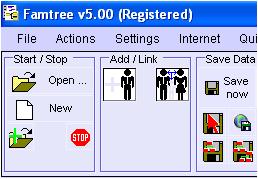
Much improved user interface - new TOOLBAR LAYOUT AND ICONS to assist ease
of use
-
Option to include HALF-SIBLINGS in Wide Family Group charts
-
Optimised for use with all SCREEN RESOLUTIONS from 800x600 upwards, and for
viewing in maximised and non-maximised windows
-
SCROLL BACK AND FORTH through all the charts and trees displayed this session
-
'SAVE NOW' facility to save your file with a single click
-
Improved access to the INTERNET from within Famtree
-
Simplified INSTALLATION process
New Features for Version 5.0.2 include -
-
Automatically selects one or two page width and orientation to make all Wide
Family Groups printable
-
Choose or omit Place of Marriage on Traditional Family Trees and Compact
Descendants Charts
-
Display and Print an Information Collection Form from the Help menu
Includes all the familiar special Famtree features including -
-
Display, print, and save complete list of any person's relatives
-
Wide Family Group displays 7 generations of relatives and partners
-
Save your data as a complete web site
-
Print Preview facility for all charts, trees, and listings
-
Option to Save your file, hiding the details of living persons
-
View all individuals and family groups by scrolling through the file.
-
Details of individuals now saveable as html files.
-
Up to 3 photographs per individual can now be linked
-
Differentiate between married and unmarried relationships (if needed)
|
(Registered Users wishing to upgrade to Famtree5 (v5.02) should
click here to find the Famtree Update Page)
'Famtree' - -
- - - -
-
is easy to use (icons & menus)
-
includes extensive manual, help and tutorials
-
runs under Microsoft Windows 7, 8, 8.1, and 10 (including
64-bit versions)
-
supports 'industry' standard Gedcom files (so you can
load files produced by others, and transfer your data to other people)
-
written by an enthusiast for other enthusiasts to use
-
you can try out Famtree free of charge (all features are enabled, but you
cannot add more than 40 people until you register)
-
the full program, including manual and sample data files can
be downloaded free of charge
-
registration (to remove the 40 names limit) usually $20US
worldwide (or £10 Sterling) is currently FREE OF CHARGE
-
genealogists in well over 40 countries are now registered
Famtree users.
 All
you have to do is - All
you have to do is -
-
Download and Install Famtree - use the link below
-
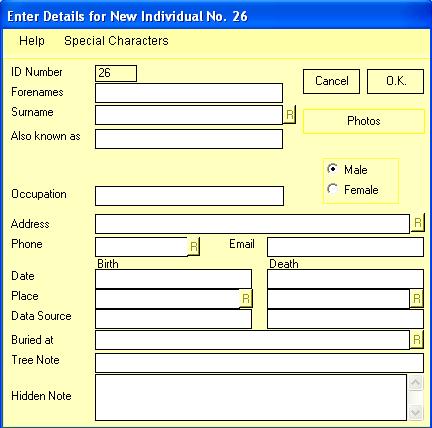
Fill in a form about each individual in your family
-
Link them into Family Groups with a few mouse clicks
Then you are ready to let Famtree -
-
Work out precisely how people are related
-
Display, print and (in most cases) save text, html or
bitmap files of -
-
ancestry charts for each individual
-
traditional family trees for each individual
-
a compact form of descendant chart for each individual
-
a unique Wide Family Group chart for each individual (showing
7 generations centred around the individual)
-
a complete list of relatives for each individual
-
an information page for each individual
-
up to 3 photographs for each individual
-
listing of all individuals in your file
-
address information for all individuals in your file
-
Save your data as a Gedcom file -
-
save the whole database into one file
-
save individual branches of your family into separate files
-
save multiple branches into files
-
save your data into a file in which details of living persons are removed
-
Save your data as html files (web pages) -
-
any ancestry chart
-
any compact descendants chart
-
an index of surnames and individuals names
-
an information page for each individual or all individuals
-
a comprehensive web site including names index, and information pages
-
a comprehensive web site including names index, trees, and information pages
You can choose how much detail to show on your trees (dates,
places, etc), and what fonts to use, and you can
hide some branches to simplify trees, or
highlight individuals in a different
colour, and
all of these 'actions' can be achieved with just one or two
clicks of the mouse.
Click here to see how easy Famtree is to
use, and to see some sample displays/outputs or why not view the
Famtree Manual now!
The program download includes the fully-illustrated manual.
Why not try out Famtree,
free of charge!
- all program facilities are fully enabled, but your file size is limited
to 40 names; larger Gedcom files from other sources can be loaded (and trees
produced), but not edited.
Download Famtree and try it out at your leisure. When you are
familiar with it, you can now register free of charge (usually £10 sterling or $20US).
Registration removes the 40 names limit.
Click here to be taken
to the Download page
Registration Instructions -
Please obtain your copy of Famtree by downloading as described above.
Try it out free of charge. When you need to exceed the 40 names limit,
register by email to receive your password free of charge. Simply send an email with 'Register Famtree' as the subject, and include your name and country in the body of the email by
.
Click here to return to the top of this page |

